
Easy to try. Easy to run. Easy to operate.
QuizDock starts without an identity provider, sets itself up from the browser, comes with sample quizzes, and is kept running with one script. When you need single sign-on, the same image switches to OpenID Connect.
Can I start without an identity provider?
Yes. Local mode is the default. A host opens the Host area, types Your name, chooses how long to Keep the seat (1, 4 or 24 hours, or Never (until I log out); 4 hours by default) and clicks Take the host seat. Participants join with the six-digit PIN and a nickname. Nobody creates an account.
There is one host seat at a time. The name is the key: typing it again on any device signs back in as that host. Local mode is therefore for trusted networks, such as a classroom, a team or a home. It is not a security boundary.
What does the setup wizard do?
A fresh instance says This instance is not set up yet. and offers Set it up. The wizard asks for a
setup token first: whoever reaches a new instance must not own it. The token is written in the instance's logs at
start (./quizdock logs). It works once and expires 24 hours after it was created.
Then eight steps, each one changeable later:
- Usage: three questions that set several settings at once (below).
- Health: the database, Redis, the migrations, the folders, the critical variables.
- Identity: the name, the language, the logo, where the feedback links lead.
- Address: the addresses offered to participants, with a test from a phone.
- Access: who may enter, and who administers the instance.
- Limits & pace, Content (the sample quizzes), Summary.
Finish the setup closes the wizard for good. With an identity provider, finishing needs a signed-in
administrator. An automated deployment skips the wizard with ./quizdock qd setup.complete.
What do the three setup questions set?
The Usage step shows What these answers set: before you click Apply. A variable locked by the
operator (ADMIN_LOCK) is left alone. Each change is written to the audit.
| Question | Answer | What it sets |
|---|---|---|
| Does this instance reach the Internet? | Yes | Update check on; the editor links to seven free media libraries. |
| No | UPDATE_CHECK=false, MEDIA_LIBRARY_LINKS=none. | |
| Who plays? | Colleagues, friends · A class, a training | The standard values: hosts wait up to 10 s for media to load; with an identity provider, every participant signs in. |
| The public, a large event | Waits up to 20 s for media (GAME_MEDIA_WAIT_S). With an identity provider, lets hosts open a game to PIN and nickname (ALLOW_ANONYMOUS_PARTICIPANTS=true). | |
| A bit of everything, other | Nothing. | |
| Do some participants need it easier? | No | 3 s to read before the timer, 1 s pause once everyone answered, animations on. |
| Yes | 6 s to read, 2 s pause, animations off (LIVE_MOTION=off). |
The same presets apply from a shell, for instance ./quizdock qd presets.apply --internet=offline.
Is there something to play right away?
Yes: twelve sample quizzes, one per country (France, Germany, Japan, Taiwan…), with their pictures (and a sound for France and Türkiye), wait in the
templates. A host takes one from Templates (an empty My quizzes page offers Browse the templates)
and gets a copy of their own. An administrator can also add them to a host's quizzes at the wizard's
Content step, from Administration › Quizzes (Add the sample quizzes), or with
./quizdock samples:load followed by the account.
Can I change the configuration from the browser?
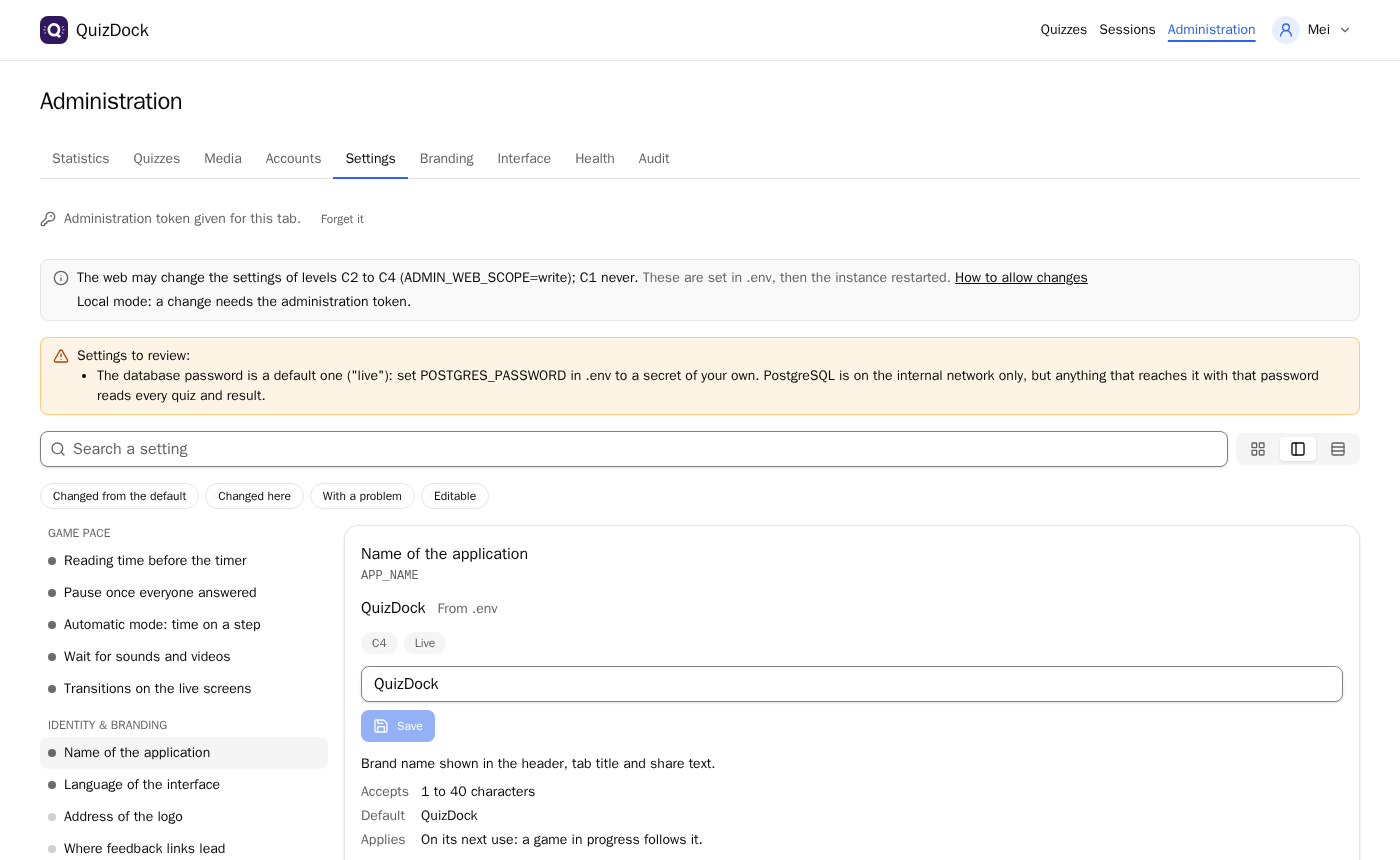
Yes, within limits the operator sets. Every setting has a level, shown next to it on Administration › Settings:
- C1, critical: start-up, data or security. Shown, never changed from the web.
- C2, high: who may enter, how much may be stored. Each change confirmed.
- C3, normal: how the instance behaves.
- C4, cosmetic: look and wording.
By default ADMIN_WEB_SCOPE=read: the page shows every value and where it comes from (default,
.env, or changed here) and changes nothing. With write, administrators change C2 to C4.
ADMIN_LOCK names variables the web never changes. In local mode, a change also needs the
ADMIN_TOKEN set in .env. The wizard is the exception: it sets C2 to C4 whatever the scope,
never a locked or critical one.
A value changed here outranks .env;
Take everything back returns to it.
How do I keep it running?
With one script, on the server, in the instance's folder:
./quizdock status    # containers, health, version
./quizdock doctor    # environment, database, migrations, Redis, media, OIDC
./quizdock backup    # database, media, templates folder, .env
./quizdock restore ./backups/quizdock-YYYYMMDD-HHMMSS
./quizdock upgrade X.Y.Z
backup writes a dated folder under ./backups/; it does not schedule itself, and it leaves
out an optional branding/ folder. upgrade backs up, pulls, restarts with the migrations,
waits for the health check and runs doctor. There is no rollback: going back means restoring the
database and the media from the same backup.
When a newer stable release is out, the administration shows QuizDock X.Y.Z is available. with the command
to run and a link to the release notes. It installs nothing; Hide until the next version dismisses it.
./quizdock status says it too. The server asks GitHub at most once a day; UPDATE_CHECK=false
turns this off.
Can I move to single sign-on later?
Yes, without changing image. Set AUTH_MODE=oidc, OIDC_ISSUER and
OIDC_CLIENT_ID in .env and restart. Hosts then need the host role, from the
provider's token or granted by an administrator. Participants sign in, unless the operator allows open games.
Quizzes created in local mode belong to local accounts, which nobody signs in to under OIDC. Nothing moves them
automatically. Once the author has signed in with their new account, an administrator hands each quiz over to it:
Administration › Quizzes, Hand over, or ./quizdock quiz:transfer with the quiz and the
account. The media only that quiz uses, and its history, follow it.
Questions
Do I need an account to try QuizDock?
No. The live demo opens on a shared host account, with uploads off and everything wiped every hour. On your own machine, the standalone image starts in local mode: the host types a name to take the host seat, participants join with the PIN and a nickname.
Do I need an identity provider?
No. Local mode (AUTH_MODE=none) is the default and needs none. It suits trusted networks: a name is not a password, so whoever types the host's name takes the seat back. When each person needs their own account, connect an OpenID Connect provider.
Can I start locally and configure OIDC later?
Yes, with the same image. Set AUTH_MODE=oidc and your provider's issuer and client in .env, then restart. Quizzes made in local mode stay in the database under their local account: an administrator hands each one over to its author's new account, from Administration › Quizzes (Hand over) or with ./quizdock quiz:transfer. Nothing moves them automatically.
How do upgrades work?
One command on the server, in the instance's folder: ./quizdock upgrade X.Y.Z. It backs up, pulls the image, restarts with the database migrations, waits for the health check and runs doctor. There is no rollback: to go back, restore the backup it took.
Can QuizDock configure itself from the browser?
Mostly. The setup wizard and the Settings page change the settings of levels C2 to C4: access, limits, pace, wording, look. The critical ones (database, Redis, authentication mode, ports) stay in .env and need a restart. Outside the wizard, web changes need ADMIN_WEB_SCOPE=write, and in local mode an ADMIN_TOKEN.
Is Docker mandatory?
In practice, yes. Every documented install uses Docker: the standalone image, or Compose through the ./quizdock script, which needs Docker with its compose plugin and curl. There is no documented install without Docker. Docker Desktop on a laptop works; set HOST_LAN_IPS so that phones are offered the right address.