Accessibility: what is built, and what is not yet.
This page is in three parts: what QuizDock implements, how it is tested, and what it does not do. It makes no claim of conformance: QuizDock has not been audited or certified.
What is implemented?
Colour and shape on every answer
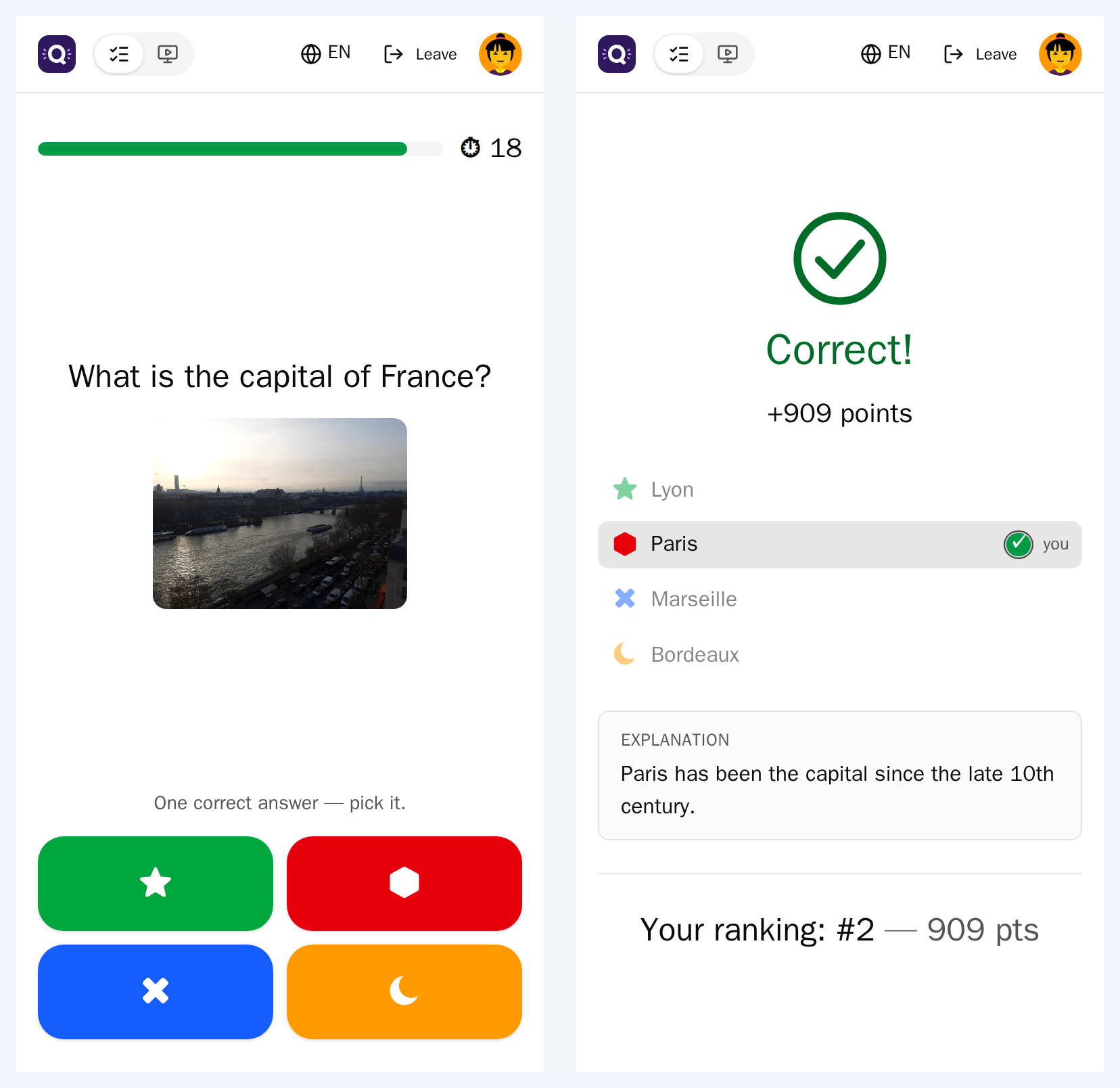
Each answer position has a fixed colour and shape: red triangle, blue diamond, yellow circle, green square, purple star, orange hexagon, pink heart, teal cross. The shape appears wherever the answer does: the big screen, the phones, the reveal, ordering and image-choice questions.
States shown by a mark, not by colour only
At the reveal, the right answer gets a mark and the answer a player picked gets a check. Wrong answers turn grey but stay readable.
Names for screen readers
Each answer tile on the phone is named by its text, its picture's alt text or its colour, and says whether it is pressed. Media carry alt text; each picture of an image-choice question needs its own (up to 300 characters). Status messages and alerts are announced, loading is announced, focus is visible, and sortable tables say how they are sorted.
Readable backgrounds
On a background image or gradient, the author picks light or dark text and can add an outline around it. Field outlines are designed for a 3:1 contrast; that is a design choice, not a measurement.
Reduced motion
LIVE_MOTION turns the transitions between steps on or off for new rooms. The host switches
Animations for their room from the console at any time. A device that asks its system to reduce motion keeps
fades only, and QuizDock's own animations stop; loading spinners keep turning.
Time to read and answer
- A reading time before each timer: 3 s by default, 0 to 10 s, for the whole instance.
- A pause once everyone has answered: 1 s by default, 0 to 5 s.
- A time limit per question, 5 to 240 s (20 by default).
- The host pauses with the space bar and adds or removes 1 or 5 seconds during a question.
- Start the timer when the media ends: listen first, answer after.
In the setup wizard, answering Yes to Do some participants need it easier? sets a 6 s reading time, a 2 s pause and no animations.
Keyboard
In the console, Tab moves focus and the space bar pauses or resumes. Escape closes dialogs, zoomed pictures and menus. The editor's lists and the answers of an ordering question can be reordered from the keyboard, and the waveform and playback controls answer to keys.
Languages
Twelve interface languages: English, French, Spanish, Simplified Chinese, Traditional Chinese, Turkish, German, Hindi, Italian, Japanese, Polish and Russian. The instance's
(APP_LANG) by default; anyone may pick theirs. Each quiz has its own content language.
How is it tested?
By automated unit and component tests, which check specific behaviours: pictures named by their alt text, the space bar and Tab in the console, the label of the PIN field, loading announced, Escape closing a dialog, the host's animation switch.
No accessibility tooling is used: no axe, Lighthouse or pa11y, no end-to-end tests, no automatic contrast check. No testing with assistive technologies is documented.
What is not done?
- No themes. No answer themes, no colour-blind theme, no letters or numbers on the answers, no contrast check of the palette.
- No right-to-left layout or language.
- No extra time per player. The time is the same for the room; the host can only add it for everyone.
- No minimum touch size rule. The phone's answer tiles are large, but no target size is enforced.
- No audit, no certification, and no conformance statement.
Questions
Is QuizDock WCAG compliant?
QuizDock makes no conformance claim. It has not been audited or certified, and it is not tested with accessibility tools. This page lists what is built in and what is missing, so that you can judge for your audience.
Can colour-blind players tell the answers apart?
Every answer carries a shape as well as a colour, on the big screen and on the phones, so no answer is told by colour alone. There is no colour-blind theme: the colours are fixed.
Can I give one player more time?
Not one player: the time is the same for the whole room. The host can give everyone more: pause, add seconds during a question, or set a longer reading time for the instance. The setup wizard's accessibility answer doubles the reading time.
Can animations be turned off?
Yes. The operator sets them off for new rooms (LIVE_MOTION=off), the host switches Animations for their room at any time, and a device that asks for reduced motion keeps simple fades only.
Can QuizDock be used with a keyboard?
Mostly, for the host. The console moves focus with Tab and pauses with the space bar; Escape closes dialogs and menus; lists, and the answers of an ordering question, can be reordered from the keyboard. Keyboard use has not been checked across every screen.
Does QuizDock support right-to-left languages?
No. The interface exists in twelve left-to-right languages: English, French, Spanish, Simplified Chinese, Traditional Chinese, Turkish, German, Hindi, Italian, Japanese, Polish and Russian.